
Salsa Gadgets
Samsung has made switching from an iPhone to a Galaxy phone more convenient with an updated Smart Switch app included with One UI 9. The new version simplifies the setup process while also allowing users to transfer more information.

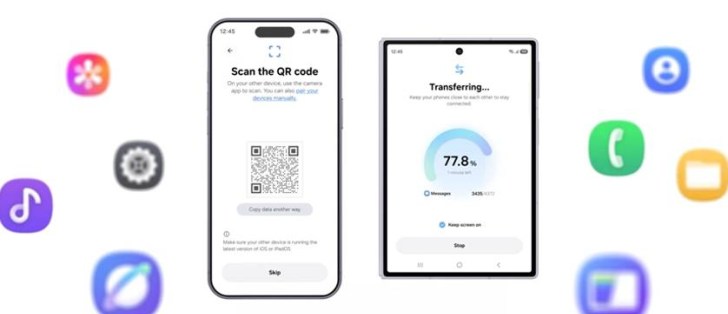
When moving from an iPhone to a Galaxy Z8 foldable, users no longer need to install Smart Switch on their iPhone. Instead, the Galaxy phone generates a QR code that can be scanned using the iPhone’s camera, after which users confirm a few settings to begin the transfer.

The updated Smart Switch can also move more data from an old iPhone. Transfers now include passwords, passkeys, call history, accessibility settings and eSIM information, alongside photos, contacts, messages, calendars and apps.
Smart Switch can be launched during the initial Galaxy setup, but Samsung also allows users to start the transfer later. This could be useful for people who previously used an iPhone as a secondary device and now want to move its data to their Galaxy phone.

Samsung has also improved file sharing between Galaxy and iPhone devices. New One UI 9 phones, along with older models running One UI 8.5, support Apple’s AirDrop, allowing Quick Share to send and receive files from iPhones.
Users can further customize the Galaxy experience through Good Lock, including home screen layouts, swipe gestures and themes.

One UI 9 is currently available on the Galaxy Z Fold8, Z Fold8 Ultra and Z Flip8, with more devices expected to receive it soon. The Galaxy S26 series is already testing its fifth One UI 9 beta, while devices such as the Galaxy A57 and Galaxy A16 5G are also part of the beta program.
